
Promoting Your Blog On Facebook The Easy Way
 Growing my network, and letting people get to know me on Facebook has now become much easier!
My blog posts are displayed on my profile, as well as on the profiles of my Blog Friends, and of their friends!
This means that the number of people who read my posts has the potential to grow exponentially.
It also means that my readers are spread two degrees of remove across my Facebook network!
Just how did I work out this mystery formula, and what will I do if I get caught?
Well, there’s no magic formula, and I don’t think that there is anything that I can get ‘caught’ for.
All I have done is add the Blog Friends application to my profile! Simple!
I have the ability to not only display my own blogs, but to add my favorites as well. By accessing Blog Friends feed, or ‘River’, I can read posts from other bloggers with a mouse click!
All this is possible without leaving Facebook!
The Blog Friends profile Box and River:
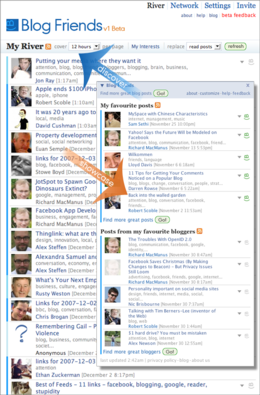 The smaller image, the profile box, is what appears on my profile.
Visitors can view my posts, and the posts of friends here.
More importantly, my blog posts appear on other peoples’ profile pages as well!
The larger image is of my River, where I can adjust my settings and preferences, find other bloggers and get an idea of what is going on all about me!
The application is at present in public beta, and I can tell you that there are more tweaks and changes coming that will enhamce the experience for users even more!
To find out more about how to showcase your blog on Facebook, go to Blog Friends!
Please Note: I use and enjoy The Blog Friends application myself, and am happy to recommend it on that basis. I am not a part of Blog Friends in any other way, and make no commitment on their behalf!
I’d love your feedback! If you wish to leave a comment, and have a blog, the Comment Luv plugin will display your last post!
Speaking of feedback, and Facebook, feel free to click my profile picture above, and add me as a friend!
Hi Allan,
It’s not often I will jump into anything, especially when it’s in beta, but this actually looks like it’s quite well advanced for something new.
You sold me on the idea simply because of the fact you can view a lot of things in the one area which is perfect, it should mean you haven’t got to click on 3 or 4 different areas to find a latest post etc..
I’m going to test this one and I will post back here once i’ve tried it out, point out what I think are it’s good points and also any pitfalls if I find any.
I’m still testing stumble, I said I was going to test it for a couple of months and I will stick to that time frame, as of yet I still haven’t made up my mind, it’s great for increasing traffic but that’s it as far as I can tell.
It will take a couple of days for me to work this new facebook into my schedule but it looks like this might allow me to do more with this one than I can with stumble, will let you know, thanks for bringing it to my attention.
Tony:)
Tony Lewis’s last blog post..At Least 22 Deaths Blamed On Freezing Ice Storms.
Hey Tony,
Thanks for the feedback! Look me up on facebook as well!
I was checking my Blog Friends stats earlier, and I am beginning to grow a good readership base there!
It’s been a relatively quiet day on the site itself, so the fact that people are still reading my content there is really encouraging!
As for Stumbleupon – stick with it! Forget about using it for traffic, just use it as a social site, stumble sites, add more interests, and as people get to know you, they will visit your site anyway!
Hi again,
I managed to check out facebook for a while, managed to fill out some details in my profile etc…have to spend some more time there though, it sounds pretty good.
As for stumble yes, I am actually using it regularly almost as a bookmark of people from BC, my mutual friends blogs I visit almost daily so it’s great for that.
I’m not exactly sure how everything works as i’m quite new to blogging but since installing google analytics on my blog about 2 weeks ago i’ve had over 2,000 page views with almost 1,000 being unique visitors which is so encouraging.
It’s not just about traffic though,i’m slowly getting more and more comments and to me that’s one of the most important things as it means at least some of my articles are worth talking about.
Ok I will check facebook out some more, probably tomorrow now as it’s late for me.
Catch you later.
Tony:)
Tony Lewis’s last blog post..Why It?s Safer Not To Wash Your Turkey.
Hi Allan, I love Blog Friends for exactly the reasons you state in your post. It’s great to be able to see your friends posts as well as have your own promoted on your profile!
Actually, I didn’t realise until last week that I had fans who read my blog on my profile… it was a nice surprise. I have seen an improvement in it’s appearance and the fact that your friends profile pictures all appear next to the post makes it kind of personal.
Great post!
Buzzing with Ange’s last blog post..Emotional Intelligence And Personal Development
Hi Ange…
And with the improvements that the application’s developers are looking at now, it is going to get even better!
This has become by far my favorite Facebook application! I haven’t seen any of the others continue to evolve beyond a certain point!
Cheers, and thanks for the comment!